Checked Out – One Dinner When Nobody Eats the Same
Built for dietitians & nutrition coaches too — see the pro tools →

One dinner, every plate different

One dinner your whole house can eat — even when nobody eats the same way.

And one shopping list that already knows Suzie wants corn and the kids need taco shells.

Suzie hates peas. Johnny decided to be vegetarian this week. You're on a GLP-1 and Dad's counting macros. Checked Out plans one dinner that works for all four of you, tells you what's different on each plate, and puts every version's groceries on the same list — the taco shells for the kids and the rice for your bowl.

No credit card to try it — plan your first week and decide after.

Tuesday, one pan, everyone fed

Beef Tacos

  • Johnny — black beans instead of beef
  • You — rice bowl, skip the tortilla
  • Suzie — corn on the side, no peppers
  • Dad — extra beef, hold the cheese
  • One dinner, not one each — with a note for every plate
  • Every version's groceries on one list, so the taco shells are on it even when you're eating a rice bowl
  • Each person's needs are their own, and you can change them any week
  • Breakfast, lunch and snacks too, so the list is done when you get to the store
★★★★★ Loved by real households — "planned my whole week in less time than a cup of coffee."
Also on Google Play

Watch the 30-second demo
The problem

Nobody at your table eats the same way anymore.

An allergy here, a diet there, a kid who's decided something this week. Every other meal planner hands you one dinner and assumes everyone eats it — so the actual work, the part where you make it fit everyone, is still yours.

Table

One dinner has to work for everyone

One person's gluten-free, one won't touch peas, one's counting macros, one just went vegetarian. You're not cooking a separate dinner for each of them — you're cooking one and adjusting it person by person, in your head, at the stove.

Cart

And the shopping happens three days earlier

That's the harder half. The cooking adjustment happens once, at the stove, where you can see the problem. The shopping happens days before, in an aisle, from memory, for everyone's version at once — the taco shells and the tortillas and the rice.

Week

Then it all starts over again

Deciding what to make, whether everyone will actually eat it, and what to buy for all of it — that's real mental overhead, every single week, before you've cooked a thing.

How it works

Set up once. Done every week.

1

Tell us about your household

Add each household member and their dietary needs, then configure how many breakfasts, lunches, dinners, or snacks you want, for how many people, over how many days. Set it once — it repeats every week.

2

Review your plan

Your plan arrives before your week starts — exactly the meals you asked for, in the amounts you set. Every dinner works for everyone eating it, with a note for each plate. Swap anything you don't want.

3

Get your shopping list

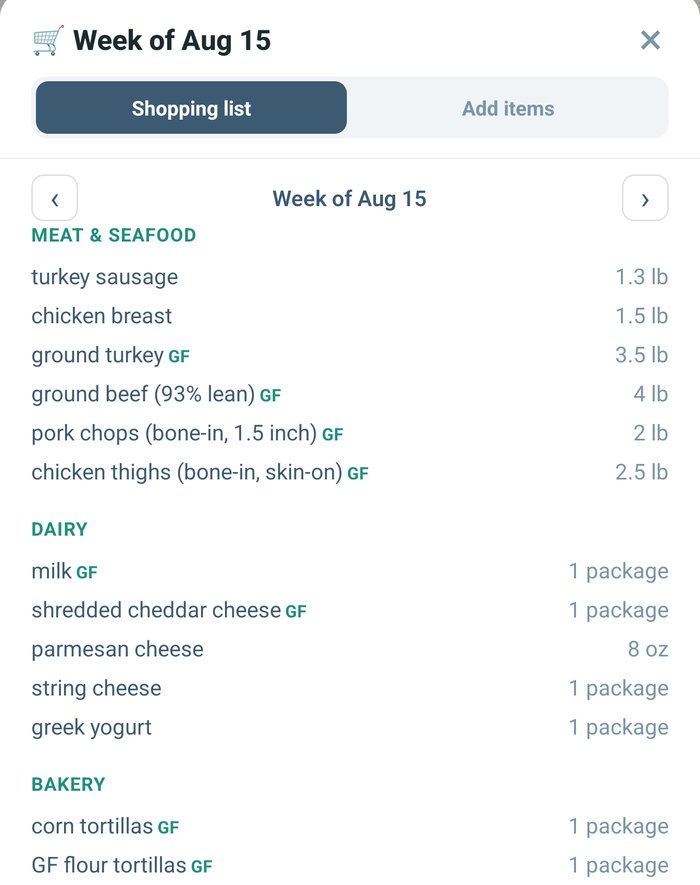
Tap "Get shopping list." You'll have a categorized list with exact items and quantities — organized by section, ready to shop wherever you go.

What's included

Everything your household actually needs.

No add-ons to hunt for, no upsells buried in settings — this is what every plan includes from day one.

Plan exactly what you need

Choose how many of each meal, how many people each serves, and how many days it covers. Recipes and quantities scale automatically.

Per-person dietary tracking

Every household member has their own dietary profile. It goes into the plan as the week is built, then the finished week is checked back against it — every ingredient, and every item on the shopping list.

Categorized shopping list, every week

Organized by section with exact items and quantities. Ready to use at any store — no account linking required.

Standing alternates on your favorites

If one of your go-to dinners always needs a different main for someone, set it once on that meal. It comes back the same way every time that dinner comes round — for anyone at the table, not just the kids.

Meal logging

One tap to mark a meal as eaten, so you can see how much of the week you actually cooked — and how many days running you've kept it going.

Checked Out shopping list screen, itemized by category with quantities
This week's list, straight from the app

Common questions

How it works when nobody eats the same.

Every household member gets their own settings — so one plan can cover people who need completely different things at the same table.

Diets

Can two people at the same table have different dietary settings?

Yes. Dietary options are set on each household member individually, not on the household — so one person can be gluten-free while another is vegetarian and a third has neither. Twelve options are available, including gluten-free, dairy-free, nut-free, low-carb, bariatric, and GLP-1.

Portions

Can it plan one dinner when one person needs a different portion?

Yes. The plan keeps one dish for the table and records a short note for the person whose serving differs — for example, “Jen: smaller portion, skip rice.” Everyone else's portion is unchanged, and nobody cooks a second meal.

Foods people won't eat

What about someone who won't eat what everyone else is having?

Everyone in the household keeps their own list of foods they won't eat — adults included, not just the kids. The plan is built around those lists and checked against them after, and where a dish still needs adjusting for one person, it says what that person gets instead right on the dinner. The rest of the table's plan stays as it is.

With a few clicks, I set 'bariatric' and 'low sugar' for me, and that my husband won't eat lamb, veal, or anything that's 'a cute baby.' In less time than it takes to make a cup of coffee, Checked Out planned my whole week, explained the variations, and built the shopping list.

★★★★★Jen H. — bariatric + low-sugar household

Pricing

One plan. Your whole household.

A single subscription covers everyone you add — partner, kids, anyone else at the table. Every plan starts with a 14-day free trial, and you don't need a card to begin one — so you can plan a real week for your own household before you decide anything.

CHECKED OUT
HOUSEHOLD PLAN · RECEIPT №0001
Monthly planBilled monthly, cancel anytime $9.99/mo
Annual planSAVE ~17%~$8.25/mo, billed annually $99/yr
Due today $0.00

14-day free trial on every plan. No card to start — we don't ask for payment details until you decide to carry on, so there's nothing to cancel if you don't.

Start your free trial →

Ready when you are.

Start your 14-day free trial today. No card, no commitment — plan a real week for your own house and see what comes out.

Start your free trial →
No card to start · $9.99/mo or $99/yr after the trial · Cancel anytime
QR code to install Checked Out on Google Play
Also available Prefer the app? Checked Out is on Google Play — scan to install. Get it on Google Play